
The day's net tells you the money that went out. Profitability tells you what your sales really leave you: every dish sold takes its cost with it, every day worked its wage, every day its share of rent, paid or not. By the end of this article you will know how to read the account, why it differs from the net, and how to adjust it to your situation.
Video coming soon
1Open the tab
Open Reports › Profitability. At the top left, pick the period: a day, a week, a month or two free dates. At the top right, in blue, the two buttons that act: Settings and Recalculate from….
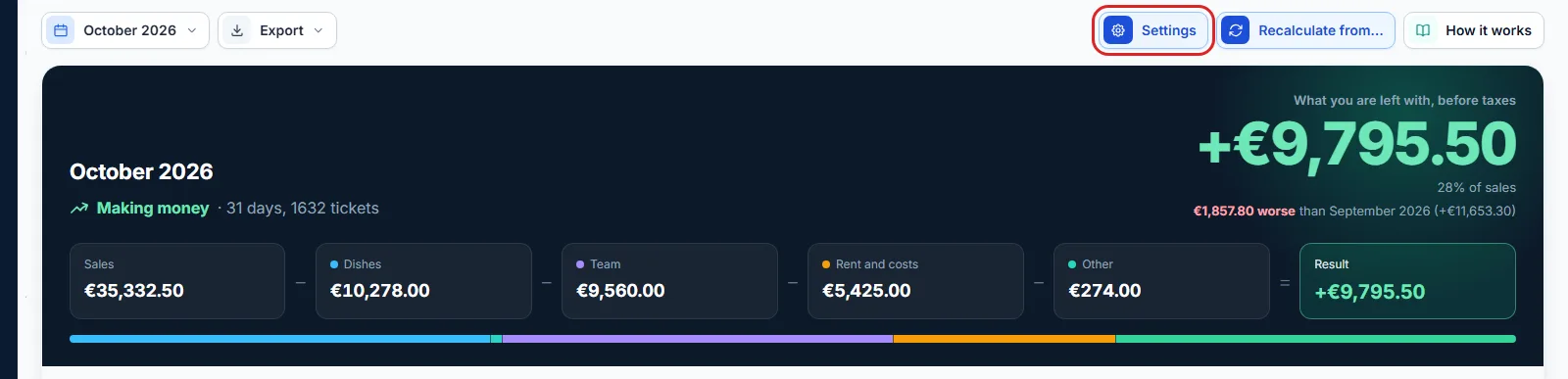
2Read the top band
The navy band says it all at a glance: the period, the verdict (making money, losing money, break-even, or to be confirmed) and, in large type, what you are left with, before taxes. Below it, the formula, cell by cell:
Sales − Dishes − Team − Rent and costs − Other = Result
The bar under the cells shows your sales eaten by each of these costs, and what is left in green, or what was missing in red. Right under the amount, the comparison with the previous period.
3The account, line by line
Under the band, the account reads like a ticket. Each line carries a simple word, and Why this figure? opens it to show where it comes from:
- What the dishes cost: the cost of every dish sold, at its recipe price on the day of the sale, plus declared losses. A dish with an unknown cost counts in sales, not in the margin.
- The team, days worked: every day clocked in, at the employee's daily rate on that day. Paid or not.
- Rent and fixed costs, share of the days: the month's fixed costs, divided by its days. Each day carries its share, a closed Sunday as much as a busy Saturday.
- Gas, upkeep and other purchases: whatever enters no recipe, on the day it is bought.
- Payment commissions: what delivery platforms and the bank keep on your sales.
- VAT to pay over: included in your prices, it is not yours.
4Why it is not the day's net
Take one day. You take in 1,000. You buy 400 of meat and pay for it; you pay 50 of gas; you give a waiter a 60 advance; the day's rent is 100.
- The day's net counts the money that went out: 1,000 − 400 − 50 − 60 − 100 = 390.
- Profitability counts what the day really cost: only 200 of meat went into the dishes sold (the rest is in the fridge and will count the day it is sold); the team worked for 220 of wages, paid or not; gas, 50; rent, 100. That is 1,000 − 200 − 220 − 100 − 50 = 430. The advance is not counted: it is part of the wage, already in the team.
Both figures are right. The net says where your till stands; profitability says whether your business makes money.
5Adjust the account to your situation
Click Settings, at the top right. Three switches, all on by default:
- I pay over the VAT included in my prices. Turn it off if you are on a flat-rate scheme: nothing is deducted. The ticket does not change.
- Count the team's wages. Turn it off if the team is paid elsewhere: the line disappears.
- Count rent and fixed costs. Turn it off if your premises are lent to you.
The top band, the PDF and the Excel then say what is not counted. Commissions and declared losses always count. The same window sets your margin thresholds: from which percentage a dish is “Promote it”, “Review it”, “Not profitable” or “Sold at a LOSS”.
Important — The verdict turns grey, “To be confirmed”, when the cost is known for less than 60% of your sales: a gain may hide a loss. The Fill in costs button takes you to your products.
6Your dishes, one by one
Further down, Your products starts with the dishes to promote and those sold at a loss, then gives the full table: sold, sales, margin and margin level. A cost that has changed since the sales shows “Cost changed on…”; Recalculate from… re-reads the sales at today's cost, without touching the price, the tickets or the stock.
Tip — A dish “Sold at a LOSS” says what each sale loses. Check its recipe first: one quantity too many (1 kg instead of 100 g) makes a wrong cost, not a real loss.